Double the Impact - Logo and Business Card Maker Guide

FREE Design Setup + FREE ART Review + FREE Manual Proofing
Chat or EMAIL us to get started.
Interactive Business Card Designs – New Build Set 9
1. Why Combine a Logo and Business Card Maker?
Imagine crafting a stunning logo and a matching business card in one go—without juggling multiple tools or spending a fortune. That’s the magic of using a logo and business card maker together! It’s like having a creative best friend who keeps everything simple, affordable, and oh-so-professional. Let’s dive into why this combo is a game-changer for your brand.
Boosting Brand Recognition
Ever notice how big brands stick in your mind? It’s all about consistency. When your logo and business card share the same vibe—think colors, fonts, and style—people start recognizing you instantly. A logo and business card maker lets you sync these up effortlessly, so your brand feels polished and memorable, whether you’re handing out cards at a coffee shop or sharing them online.
- • Unified design builds trust with customers.
- • Stand out at networking events with cohesive visuals.
- • Reinforce your identity across every touchpoint.
Saving Time and Money
Let’s be real—running a business is hectic, and your budget isn’t infinite. That’s where a low-cost logo and business card maker shines. Instead of hiring a designer or wrestling with complicated software, you get everything done in one place. It’s quick, it’s economic, and the results? Still top-notch. You’ll have more time to sip that coffee and less stress about costs.
- • Affordable tools cut design costs by up to 80%.
- • Finish both projects in under an hour.
- • No design skills? No problem—it’s beginner-friendly.
So, why juggle separate tools when you can double your impact with one? A logo and business card maker isn’t just smart—it’s your shortcut to a professional brand that doesn’t break the bank. Ready to see how it works? Let’s keep going!
2. Choosing the Right Tool for Your Needs
Picking the perfect logo and business card maker can feel like finding the right pair of shoes—comfort, style, and budget all matter! Not every tool is created equal, so let’s break down how to choose one that fits your vibe and wallet. Whether you’re a startup dreamer or a seasoned entrepreneur, there’s an affordable option waiting for you.
Free vs. Paid Options
Free logo and business card makers are like a gift for startups—zero cost, tons of templates, and a quick start. Paid tools, though, step it up with extras like premium designs and high-res downloads. Which one’s your match? If you’re just dipping your toes in, free is fab. Scaling up? A small investment might be worth it.
- Free: Perfect for testing ideas without spending a dime.
- Paid: Unlocks advanced features for a pro finish.
- Tip: Start free, upgrade later—it’s low-risk!
Key Features to Look For
A great tool does more than just slap a logo on a card—it’s your creative sidekick. Look for customization (tweak to your heart’s content), templates (inspiration galore), and printing options (because who doesn’t love a tangible card?). With an easy logo and business card maker, you’re in control without the overwhelm.
- Drag-and-drop editors for simplicity.
- Hundreds of budget-friendly templates.
- Direct printing or download options.
Finding the right fit means less stress and more fun—your brand deserves that!
3. Designing a Memorable Logo on a Budget
A killer logo doesn’t have to cost a fortune—honest! With a budget logo and business card maker, you can craft something unforgettable without emptying your pockets. Let’s explore how to make your mark, step by step, with tools that keep it cheap and chic.
Using Templates Effectively
Templates are your secret weapon—think of them as a head start to greatness. Pick one that vibes with your brand, then tweak colors, shapes, or icons to make it yours. It’s like customizing a recipe: start with the base, add your flavor, and voilà—a logo that pops!
Pro Tip: Swap out default fonts for a personal touch—small changes, big impact!
Adding Personal Flair
Your logo should scream “you.” Play with hues that match your vibe—soft pastels for a bakery, bold reds for a gym—and toss in shapes that tell your story. A budget tool like this keeps it affordable while letting your personality shine. Need a hand? Free design setup from pros can elevate your game.
Fun Fact: 75% of people recognize brands by their logos—make yours stick!
With these tricks, your logo’s ready to turn heads—without the hefty price tag.
4. Crafting Business Cards That Pop
Your business card is your mini billboard—make it unforgettable! With a business card maker with logo, you can whip up something eye-catching that leaves a lasting impression. Let’s dive into the must-haves and creative twists that’ll have people holding onto your card.
Essential Elements to Include
A card without the basics is like a cake without frosting—still good, but missing the wow. Your name, contact info, and logo are the stars here. Keep it clean and simple so folks can reach you fast.
| Element | Why It Matters |
|---|---|
| Name | Who you are, front and center. |
| Contact Info | Email or phone—keep it easy. |
| Logo | Ties it to your brand. |
Creative Design Tips
Boring cards get tossed—let’s make yours a keeper! Go bold with colors that match your logo, or keep it sleek with a minimalist layout. A custom logo and business card creator lets you experiment until it’s just right. Think outside the box—maybe a splash of texture or a quirky shape?
| Tip | How to Nail It |
|---|---|
| Bold Colors | Match your brand palette. |
| Clean Layout | Space out elements nicely. |
| Unique Twist | Try rounded corners or foil. |
With these ideas, your card’s not just a contact—it’s a conversation starter. Ready to design?
5. Integrating Logo and Card Design Seamlessly
Picture this: your logo and business card working together like peanut butter and jelly—different, but oh-so-perfect as a pair. A logo and business card maker makes this harmony a breeze, ensuring your brand looks sharp and unified. Let’s unpack how to blend them smoothly for that pro-level polish.
Matching Colors and Fonts
Consistency is your brand’s best friend. Pick a color scheme—maybe a soft blue or vibrant green—and stick with it across your logo and card. Pair it with a font duo (one bold, one simple) to tie it all together. An online logo and business card tool lets you play until it feels just right.
| Aspect | Tip |
|---|---|
| Colors | Use 2-3 shades max. |
| Fonts | Match logo title to card text. |
Previewing Your Work
Before you hit “done,” take a sneak peek. Most makers let you see your logo and card side by side—do they vibe? Zoom in, check alignment, and imagine handing it out. This step saves you from oops moments and keeps your brand on point.
Quick Check: Does it look good big and small? You’re golden!
Seamless design is your ticket to looking like a pro—without the pro price!
6. Affordable Printing Options for Small Businesses
You’ve got your designs—now let’s get them into the world! Printing doesn’t have to drain your bank account. With a cheap business card and logo maker, you can find budget-friendly ways to bring your vision to life. Here’s how to score quality prints on a dime.
Comparing Costs
Bulk orders are your wallet’s BFF. Many services slash prices when you print more—think 100 cards for the cost of a fancy latte. Compare deals online to snag the most economic option that still delivers crisp results.
- Check per-card rates—lower with bigger batches.
- Look for free shipping promos.
- Test with a small run first.
Quality vs. Price
Cheap doesn’t mean flimsy! Opt for sturdy paper (like 14pt stock) and vibrant inks that won’t fade. Affordable logo design and business card printing can still feel luxe—your clients won’t know you saved big.
Sweet Spot: Matte finishes are low-cost and classy!
Smart printing keeps your budget happy and your cards stunning—win-win!
7. Maximizing Impact with Digital Cards
Paper’s great, but digital cards? They’re the future! An online logo and business card tool can help you go virtual, reaching more people with less effort. Let’s explore how to make your brand pop in inboxes and on screens.
Sharing Online
Email your card, post it on socials, or link it in your bio—digital cards spread fast. They’re easy to share and save, making them a budget-friendly way to network. Bonus: no printing costs!
- • Attach to email signatures.
- • Share via Instagram Stories.
- • Save as a PDF for clients.
Adding QR Codes
QR codes are like magic portals—scan, and boom, they’re on your site! Add one to your digital (or printed) card with an easy logo and business card maker. It’s a modern touch that wows. Need inspo? Check out free business card design setup.
Pro Move: Link it to your portfolio!
Digital cards amplify your reach—modern, sleek, and oh-so-smart.
8. Common Mistakes to Avoid
Even the best plans can trip up—let’s dodge those pitfalls! A custom logo and business card creator is awesome, but a few missteps can dim your shine. Here’s what to watch out for, so your brand stays flawless.
Overloading Designs
Less is more—really! Cramming too many colors, fonts, or graphics can make your logo and card look messy. Keep it simple and clean for a pro vibe that’s easy on the eyes.
Warning: Too busy = too confusing—stick to essentials!
Ignoring Print Specs
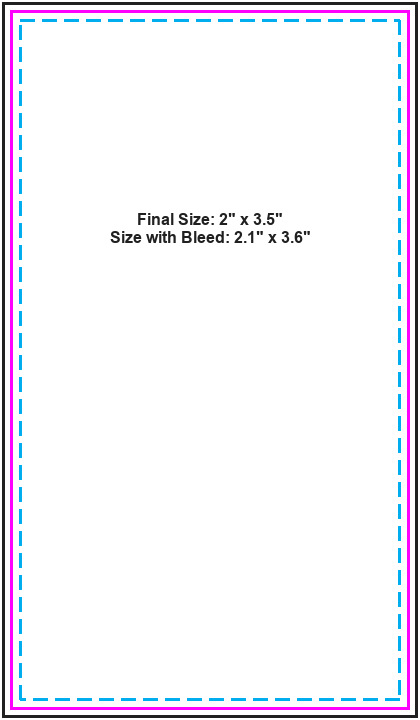
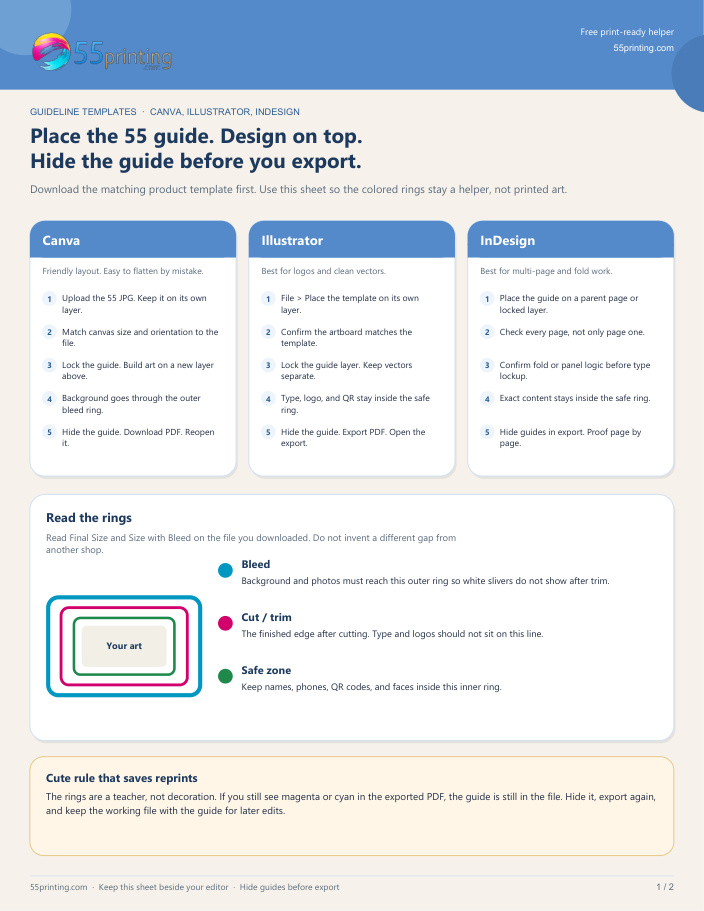
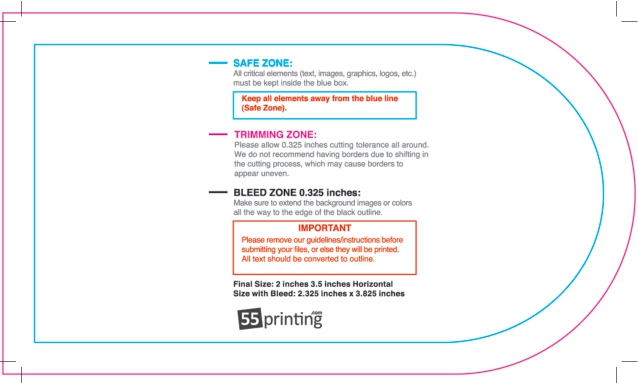
Ever seen a blurry card? Yikes. Check sizes (standard is 3.5”x2”) and resolutions (300 DPI minimum) before printing. Affordable logo and business card design still needs to look crisp IRL.
Fix It: Use the maker’s print guidelines—save the headache!
Sidestep these traps, and your brand’s ready to impress—every time.
9. Scaling Your Brand with Consistent Designs
Your logo and card are just the start—let’s grow! A logo and business card maker sets the stage for a brand that scales effortlessly. Here’s how to stretch that consistency into bigger wins, all while keeping it budget-friendly.
From Cards to Marketing
Take your logo beyond cards—slap it on flyers, banners, or social headers! A budget logo and business card creator makes it easy to adapt without starting over. Same look, new places—your brand’s everywhere.
| Item | How to Use It |
|---|---|
| Flyers | Add logo top center. |
| Social Posts | Overlay on graphics. |
Long-Term Value
A solid design lasts—think years, not months. Invest time now with a maker, and you’ll save later on redesigns. For quality prints to match, try 55printing.com—they’ve got your back.
Truth: Timeless beats trendy for ROI!
Scale smart—your brand’s future is bright and budget-friendly.
10. Tools and Resources for Success
Ready to rock your designs? Let’s arm you with the best tools and tricks! A free logo and business card maker is your starting line, but there’s more to explore. Here’s your go-to list for success—cheap, easy, and awesome.
Top Makers Reviewed
Canva’s free and fun, VistaPrint’s got premium pizzazz, and FreeLogoServices keeps it low-cost. Each shines for different needs—play with them to find your fave!
- Canva: Free, tons of templates.
- VistaPrint: Pro printing options.
- FreeLogoServices: Budget king.
Learning More
New to this? No sweat—tutorials and guides are your pals. YouTube’s packed with free videos, and maker sites often have tips. Level up your skills without spending a cent!
Start Here: Search “logo design basics” online!
With these resources, you’re unstoppable—design like a pro, spend like a newbie!
11. Your Guide to Logo and Business Card Success
Master your brand with a logo and business card maker—affordable, easy, and impactful!
Start with an Idea
Pick a vibe that’s all you—simple or bold, it’s your call.
Design with a Maker
Use templates and tweaks for a pro look on a budget.
Match Seamlessly
Sync colors and fonts for a cohesive brand.
Print or Go Digital
Cheap prints or QR codes—reach everyone!
Key Takeaway: A logo and business card maker doubles your impact—fast, affordable, and stunning!
Why It Works
- ✓ Saves time and cash.
- ✓ Builds a pro brand.
- ✓ Scales with you.
Your Brand, Unleashed!
12. Frequently Asked Questions About Logo and Business Card Makers
Got questions? We’ve got answers! Explore everything about using a logo and business card maker below.
? What is a logo and business card maker?
It’s a handy tool that lets you design both a logo and business card in one go—affordable and easy for anyone!
? Can a logo and business card maker be free?
Yes, many offer free versions with templates—perfect for startups on a budget.
? How do I use a logo and business card maker?
Pick a template, tweak colors and text, then download or print—simple as that!
? Are logo and business card makers good for beginners?
Absolutely—they’re designed to be user-friendly, no design skills needed.
? What makes a logo and business card maker affordable?
Low-cost or free options cut out pricey design fees—great for small businesses.
? Can I print with a logo and business card maker?
Yep—many let you order prints directly or download files for cheap printing.
? How long does a logo and business card maker take?
Most designs wrap up in under an hour—fast and fuss-free!
? Do logo and business card makers offer templates?
Yes, hundreds of customizable ones to kickstart your creativity.
? Can I customize with a logo and business card maker?
Totally—adjust colors, fonts, and layouts to match your style.
? Are logo and business card makers good for branding?
Definitely—they keep your look consistent and memorable.
? What’s the best logo and business card maker?
It depends—Canva’s free, VistaPrint’s premium, pick what fits you!
? Can a logo and business card maker go digital?
Yes—create digital cards with QR codes for easy sharing.
? Do logo and business card makers save time?
Big time—streamline design and skip the back-and-forth.
? How do logo and business card makers help small businesses?
They offer low-cost, pro designs to compete with the big guys.
? Why choose a logo and business card maker over a designer?
It’s cheaper, faster, and you’re in full control—DIY vibes!
Still curious? Your logo and business card maker journey starts here!